

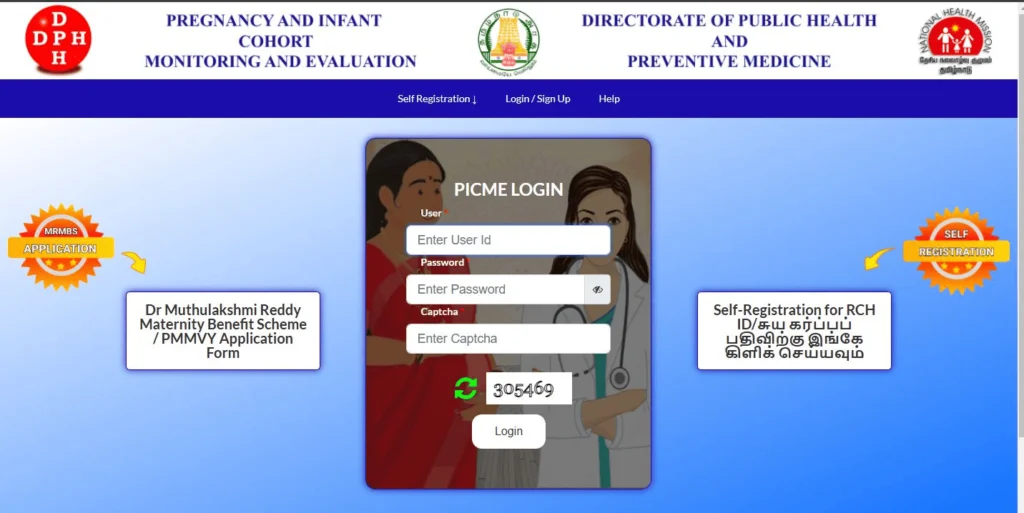
If you’re looking for the most current and clear guidance on PICME 3.0 login, you’ve come to the right place. This article walks you through every step—what PICME is, how to self-register, how to log in, how to reset your password, status tracking, and the use of the PICME Parental app. We’ve ensured every detail matches the real system in 2025, so you get accurate and actionable advice—not generic fluff.
What Is PICME 3.0?
PICME (Pregnancy and Infant Cohort Monitoring & Evaluation) is Tamil Nadu’s digital tool to record and track pregnancies and postnatal care, enabling clean delivery of maternal and child health services. The updated 3.0 version offers:
- A modernized interface
- Streamlined, user-friendly navigation
- Stronger security measures
- Better support for healthcare workers and mothers to register, track, and manage their profiles
These enhancements make PICME 3.0 login smoother and more reliable for users across Tamil Nadu.
Who Should Use PICME 3.0?
- Pregnant women and new mothers in Tamil Nadu seeking to register their pregnancies, monitor ANC/PNC status, or apply for government benefits
- Public health workers, such as ANMs (Auxiliary Nurse Midwives) and staff at PHCs and UPHCs, who assist in registering beneficiaries
- Health officials and program managers monitoring maternal and child health trends across districts
Getting Started: Self-Registration
- Enter your mobile number or RCH (Reproductive and Child Health) ID on the PICME portal.
- Complete the form with your full name, age, address, and pregnancy details.
- Submit supporting documents such as medical reports and ANC cards, if required.
- Receive a 12-digit RCH ID—this unique identifier is central to your profile and future logins.
How to Login to PICME 3.0
Using RCH ID
- Navigate to the login page and enter your 12-digit RCH ID.
- Provide your registered mobile number or OTP, if prompted.
- Complete the Captcha or security check.
- Click “Login” to access your dashboard, where you can view ANC status and appointment details.
Using Mobile Number (Alternate Method)
- Enter your registered mobile number.
- Receive and input an OTP.
- Access your dashboard just like with RCH ID login.
Forgot Password or OTP Not Received?
If unable to login due to password or OTP issues:
- Click on “Forgot Password” on the login page.
- Enter your registered RCH ID or mobile number.
- An OTP will be sent to reset your password.
- If OTP fails, verify your mobile number is active and network is stable; request OTP again.
- Contact the nearest PHC or ANM for assistance if issues persist.
Tracking Status on PICME 3.0
Once logged in, you can:
- View pregnancy details, such as estimated delivery date and ANC visits.
- Track service uptake, like vaccinations or nutritional packages.
- Download documents, including pregnancy tracking sheets or benefit receipts.
- Update personal information, like address or contact details, with verification from health staff if needed.
Introducing the PICME Parental App
New in 2025: the PICME Parental mobile app, designed for easy, on-the-go access:
- Login via RCH ID or mobile number + OTP
- Quick overview of ANC schedules, upcoming appointments, and alerts
- Receive notifications for immunizations and health check reminders
- Upload updates or documents from your phone
- Locate nearby PHCs or OB-GYN clinics using in-app maps
Best Practices for a Smooth Login Experience
- Always use your registered mobile number, and keep it active—OTP depends on it.
- Store your 12-digit RCH ID safely once registered.
- Use unique, strong passwords if creating one instead of OTP.
- Log out after each session, especially on shared devices, for your security.
- Update your contact/address details through the portal or with help from your ANM.
- Keep the app updated to receive the latest features and security improvements.
Summary Table: PICME 3.0 Login At A Glance
| Feature | Details |
|---|---|
| Self-Registration | Enter mobile/RCH ID → Fill form → Submit → Get 12-digit RCH ID |
| Login Options | RCH ID + mobile or OTP; or mobile number + OTP |
| Forgot Password/OTP Issues | Use “Forgot Password” feature or approach your local PHC staff |
| Dashboard Features | ANC tracking, appointments, service status, document downloads |
| PICME Parental App | Mobile access, alerts, uploads, maps, appointment reminders |
FAQ (Frequently Asked Questions)
- Can I register for PICME 3.0 myself, or must I go through a health worker?
You can self-register using your mobile number or RCH ID through the portal; health workers can assist if access is limited. - What if I lose my RCH ID?
Request it via the “Forgot Password” flow, or contact the PHC/ANM with your registered mobile number for recovery. - Do I need a password, or is OTP enough?
OTP is the default and most secure method. If allowed, you may set a password for convenience; ensure it’s strong and unique. - Can I track child immunizations through PICME 3.0?
Yes—your dashboard shows vaccination status and sends reminders. - Is the Parental App free to download and use?
Yes, the PICME Parental App is free and available on major app stores for supported smartphones. - Who do I contact if login fails due to technical errors?
Reach out to your local ANM or PHC, where health staff can troubleshoot or escalate issues. - Can the app be used even without internet access?
Basic features like schedule overview may work offline, but full functionality (OTP, uploads) needs connectivity.