

What Is Hamraaz and Who Can Use It?
Hamraaz is the Indian Army’s digital self-service platform that enables serving personnel to securely access services such as PaySlip/Form-16, personal data, postings, and administrative tools. The platform provides three distinct access portals:
-
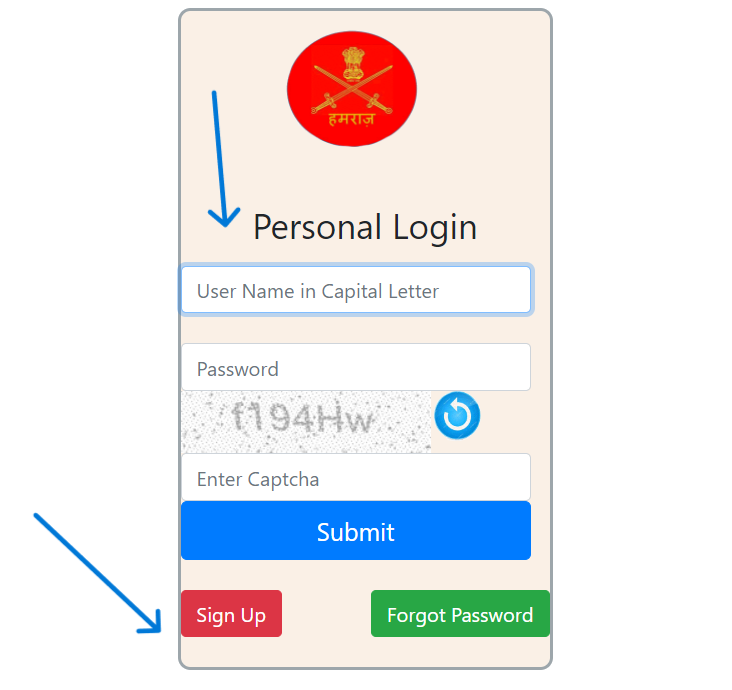
Personal Login – for individual army personnel
-
Unit Login – for unit-level administrative officers
-
RO (Records Office) Login – for Records Office staff
Additionally, the portal features utilities such as Sign-Up, Forgot Password, and Pay Calculator, ensuring streamlined access for various user roles.
Why Hamraaz Matters in 2025
-
On-demand pay and personnel access – retrieve Pay Slips, Form-16, and personal records from anywhere
-
Role-specific access control – safeguards data integrity and privacy
-
Integrated tools – such as a Pay Calculator to estimate earnings or deductions
How to Perform Hamraaz Login (Personal / Unit / RO)
Step-by-Step Guide
Personal Login
-
Choose the Personal Login option.
-
Enter your Details:
-
Registered Mobile Number
-
Password, or opt for OTP (One Time Password) if available
-
-
Complete the captcha or verification challenge.
-
Click Submit to access your personal dashboard with PaySlip/Form-16 and related services.
Sign Up Process (For First-Time Users)
-
Select the “IT-Service Sign Up” or “Registration” option.
-
Provide:
-
Name, Email Address, and Mobile Number
-
Army Service Number (ASN)
-
Additional Validation Data (such as date of birth or rank)
-
-
Set a Secure Password.
-
Receive OTP on your registered mobile number, and complete verification.
-
Create your account and gain access to your personal dashboard.
Unit or RO Login
-
Choose your relevant access path — either Unit or RO (Records Office).
-
Log in using:
-
Unit Admin Credentials, or
-
RO Personnel Credentials (login ID, password)
-
-
Complete any verification or captcha challenge.
-
Access role-appropriate dashboards for tasks like generating Pay Slips, approving changes, or managing records.
Features & Tools in the Hamraaz Portal
Payroll and Documentation
-
PaySlip Generation – monthly Pay Slips are available in digital format.
-
Form-16 Access – year-end tax documentation for income verification and tax filing.
Administrative Tools
-
Pay Calculator – estimate salary, deductions, allowances before final processing.
-
Personnel Detail Updates – request or view updates to posting, rank, or personal data.
-
Downloadable Records – generate downloadable PDF or printable versions of documents.
Security and Account Management
-
Two-Factor Authentication (2FA) – via OTP or registered mobile to guard account access.
-
Password Reset – via “Forgot Password” followed by OTP and security question flows.
-
Session Timeout and Logout – enforced to prevent unauthorized access during inactivity.
Common Issues & Troubleshooting in Hamraaz Login
| Problem | Possible Cause | Solution |
|---|---|---|
| Forgot Password or Mobile Number | No OTP received or credentials forgotten | Use “Forgot Password” or contact admin for reset |
| Login Session Timeout | Inactivity or server timeout | Log in again and complete operations promptly |
| Invalid Captcha or OTP | Typo or expired challenge | Re-enter carefully or request a fresh one |
| Incorrect ASN or Registration Data | Data mismatch during sign-up or login | Verify ASN or registration info with Records Office |
| Service Unavailable | Portal maintenance or server downtime | Retry after some time or contact technical support |
Best Practices for Hamraaz Users
-
Use official access points only, and bookmark for quick access.
-
Keep login details secure — update passwords periodically and avoid sharing credentials.
-
Use registered mobile number for OTP and recovery processes.
-
Download and store copies of PaySlip and Form-16 for personal record-keeping.
-
Report lost access or discrepancies promptly to unit administration or Records Office.
FAQ | Frequently Asked Questions
1. Who is eligible to register for Hamraaz login?
All serving Indian Army personnel with a valid Army Service Number (ASN) and mobile number are eligible to register.
2. Can I use the portal from any device?
Yes — Hamraaz Web is accessible via desktop or mobile browser. Ensure a stable internet connection and avoid using public networks for sensitive actions.
3. How long does it take to view my PaySlip?
PaySlips are uploaded monthly; once available, you can view or download it immediately after successful login.
4. What if I don’t receive the OTP during sign-up or login?
Ensure your mobile number is active and in-service. If still an issue, wait a few minutes or contact admin to verify the number and send again.
5. Can I update my personal details through the portal?
You can view your details; to update (e.g., posting, rank), submit a request or contact your unit admin or Records Office, depending on permissions.
6. What should I do if I suspect my account is compromised?
Immediately change your password, inform your unit admin, and log out from all devices. Enable OTP-based login for added security.
7. Is there a support channel if I’m locked out?
Yes — reach out to your unit administrator or Records Office staff for password reset or account recovery assistance.
Summary
This guide has outlined everything you need to know about the Hamraaz login process—from account registration, access types (Personal, Unit, RO), features like PaySlip/Form-16 and Pay Calculator, security practices, and how to troubleshoot common problems. The FAQs serve to clarify typical user queries.
By following these instructions and best practices, you can confidently use Hamraaz as your go-to portal for managing Indian Army personnel services securely and effectively.